Skywatcher StarGate 18 Truss Dobson

With the new Sky-Watcher StarGate 18, large scopes for all!

Dobsons are great “bang for the buck” with their quick setup, simple optics and ease of use.  An 8″ Dobson should be everyone’s first telescope; not too big, not to expensive, but with great capability and endlessly upgradeable.  Didn’t listen to that bit of wisdom… and now realize my mistake.  But one of the drawbacks with Newtonians is that as you seek to dive deeper into space by increasing the telescope size, you quickly reach a point where the optical tube becomes too big to transport.  One way to get around this issue is to have a “collapsible” optical tube by using a truss design.

When Meade launched the LightBridge series back in 2008 it brought this great concept to everyone’s doorstep.  But the largest offered was a 16″ and weighted in a 130 lbs assembled.  Going bigger was out of the question.  But now Sky-Watcher has addressed the weight issue with a great design and a good choice of materials.  The StarGate 18 weighs in at 110 lbs and looks great!

Sky-Watcher StarGate 18

Sky-Watcher StarGate 18

The optics are standard F4 Newtonian design: 458mm diameter and 1900mm focal length.  The primary mirror is not solid, but designed with ribs to allow for a thinner (and lighter) design, while maintaining rigidity. Even the secondary mirror has cells carved out to reduce weight.  The tubes use quick-assembly clamps and Sky-Watcher claims a setup time under 30 minutes.

The rocker-designed base with counter weight is a very nice touch, everything sliding on Teflon bearings.

OK the $7,300CAD price means it’s not for everyone, but when one considers that a similar sized Ritchey-Chretien astrograph will be over 5x the price, and you still have to find a suitable EQ mount for it, it’s a bargain.

Source: Sky-Watcher

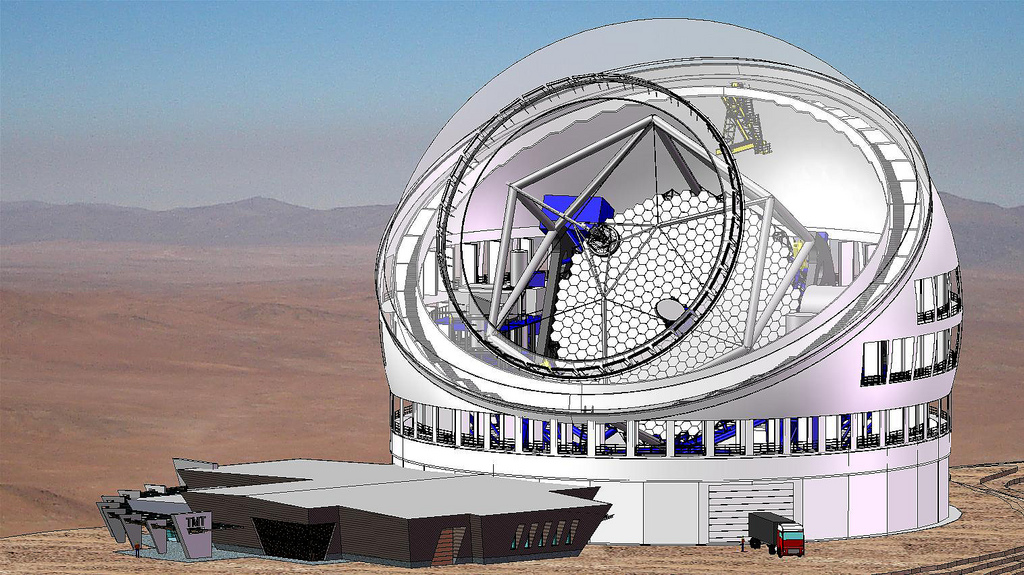
It’s GO for the Thirty Meter Telescope (TMT)

We all have aperture fever, not just us crazy backyard astronomers, and with the latest announcement from the Canadian Government to provide nearly $250 million over 10 years, we should see the TMT operational in 2023-2024.  When completed it will be the largest telescope, until the Europeans have their European Extremely Large Telescope (E-ELT), also set for first light in 2024.

Thirty Meter Telescope - Courtesy TMT International Observatory

Thirty Meter Telescope – Courtesy TMT International Observatory

The telescope optical design is a folded Ritchey-Chrétien. Both the primary and secondary mirrors are hyperboloidal, and together they form a well-corrected focus. The tertiary mirror is used to fold and steer the light path so that the science beam can be delivered to any of eight instruments that will be mounted on the two main Nasmyth platfoms. The image is formed 20 meters from the center of the tertiary mirror. The focal ratio of the telescope is f/15.

The field of view of the telescope is 15 arc minutes (fully illuminated), or 20 arc minutes with slight vignetting at the edges of the field. At f/15, the focal length of TMT is 450 meters (1476 feet)! This means that the 20 arc minute field of view measures 2.618 meters (8.6 feet) in diameter.

The primary mirror focal ratio is f/1. This short focal ratio was chosen to make the telescope compact, which helps to keep the telescope structure and the enclosure affordable. As the name implies, the primary mirror is 30 meters (98 feet) in diameter, and because it is f/1 it has a focal length of 30 meters.

Current king of the largest light-bucket is the 10.4m diameter Gran Telescopio Canarias.  Therefore the 30m TMT and the 39m E-ELT will be a considerable gain in light gathering power over the current crop of telescopes.  Some are predicting that scientists will be able to directly observe planets orbiting distance stars, and perhaps even see distant oceans and weather formations.

It’s always intrigued me how we spend so much on EQ mounts, when these large telescopes operate in a simpler Alt-Az configuration.

Sources: CBC, TMT

Could the Moon have its own moon?

I was reading the “Science & Vie” magazine when I came across a question from one of the readers: “Does the Moon have satellites?”  At first I considered this quite a silly question, but then realized that we have placed artificial satellites around the Moon.  So why could there not be natural ones?

The Moon is not billiard-ball smooth gravitationally.  It’s heavily scared surface due to past asteroid and comet impacts have affected the local density of the surface crust, and therefore the local gravity field varies across the surface of the Moon.

Map of gravity acceleration values over the entire surface of Earth's Moon.  Lunar Gravity Model 2011

Map of gravity acceleration values over the entire surface of Earth’s Moon. Lunar Gravity Model 2011

One of the famous effects of these local gravitational variations is the Apollo 11 landing, where Neil Armstrong had to take manual control to land, some 5km down range where the navigational computer was targeting.

Another factor is that any satellite around the Moon would also be under the influence of the Earth and the Sun.  Any asteroid captured by the Moon would quickly be ejected due to all these influences.  Now there are more favorable orbital angles: 27, 50, 76 and 86 degrees from the Moon’s equator.  But it would still be a highly unstable orbit.  All spacecraft that are placed in orbit around the Moon need to use up propellant to maintain orbit over time.  And when propellant is about to run out, most space agencies elect to purposely crash the satellite to obtain additional science data.  One recent example is NASA’s LADEE moon orbiter crashing on the Moon on April 18th, 2014.

In conclusion, no our Moon does not have any natural satellites, and if by chance it would capture a wandering asteroid, most experts believe it would only survive a century at most before impacting the lunar surface or getting flung out of orbit.

Comet 67P/Churyumov–Gerasimenko : Where is it, and where will it be.

In my previous post I’ve mentions that coment 67P/Churyumov–Gerasimenko is currently between the orbits of Jupiter and Mars, on a trip towards the Sun.  While some comets take decades to become visible again this one has an orbital period of 6.44 years, therefore a frequent visitor.  That was one of the selection criteria for the target comet: short orbital period such that it did not take too much fuel or planetary gravity assist to intercept.

On August 13th it will be at it’s closest position to the sun (perihelion), therefore brightest and a good time to observe.  Afterwards it will be swinging back out towards Jupiter on its elongated orbit.  For people in the Northern Hemisphere, the best time to observe comet 67P will be after this August date.  Below is a chart showing that the comet will be visible in the early morning starting in June 2015, and will be visible at higher altitudes in the sky throughout the following months.

Comet 67P visibility for around 45 Latitude N.

Comet 67P visibility for around 45 Latitude N.

Below is a chart (click to enlarge) showing the position of 67P until November 15th.

Comet 67P/Churyumov–Gerasimenko sky chart for Nov 2014 to Nov 2015

Comet 67P/Churyumov–Gerasimenko sky chart for Nov 2014 to Nov 201

A good photographic opportunity will be August 8th when comet 67P will pass right under open cluster M35.

Comet 67P passing under Open Cluster M35

Comet 67P passing under Open Cluster M35

Graphics generated with C2A Planetarium Software

Comet 67P/Churyumov–Gerasimenko – Can we see it?

First of all I want to congratulate the Rosetta team on their successful landing of Philae on the comet surface.  When you consider that the spacecraft was launched 10 years ago, it was essentially designed and assembled with 15-year-old technology.  Back then, digital cameras were just entering the market and the Palm III PDA was the mobile device everyone wanted.  In fact, much of the code running on Rosetta and Philae was developed after the aircraft was launched.

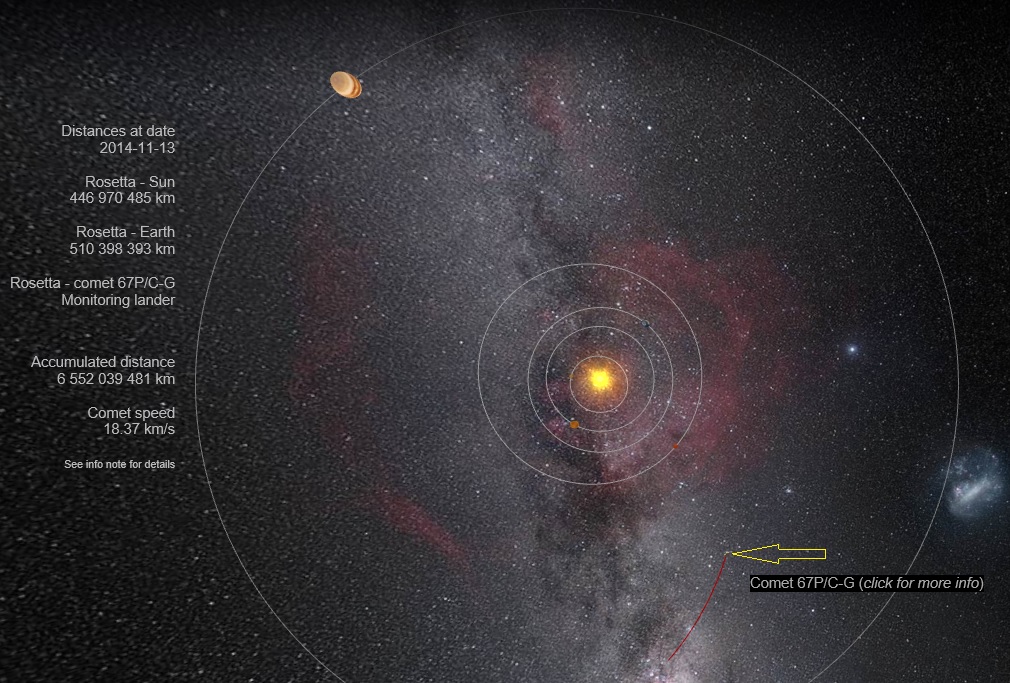
Presently 67P is located between Jupiter and Mars, on its swing towards the sun. To give you an idea how far out it’s located in the solar system, it takes over 28 minutes for radio communications from Rosetta to reach Earth.  Therefore if mission control sends a comment to Rosetta, the results are only known one hour later!

Location of comet 67P/Churyumov–Gerasimenko on November 13th, 2014

Location of comet 67P/Churyumov–Gerasimenko on November 13th, 2014 (Credit: ESA)

Starting in May 2015 67P will become visible to observers in the Northern Hemisphere, and will gradually brighten until achieving perihelion on August 13, 2015.  Because it does not venture very close to the sun, past observations indicate that it will only reach magnitude 11 at best; a challenge to backyard telescopes.

Better slew your observation by 9 degrees north, that’s where comet 141P/Machholz will be in the same constellation (Gemini) and at magnitude 8; a slightly brighter target.  And if you have no luck observing either comets or capturing them on photo, open cluster M35 is in the area.

Until then, you can follow Rosetta and Philae’s adventure on their blog: blogs.esa.int/rosetta/

Creating Diffraction Spikes with GIMP 2.8

Updated procedure to use a transparent background for the brush pattern. Also broke down certain steps into more details.

Benoit Guertin's avatarBen Backyard Astronomy

Updated on November 3rd, 2014

Photos of open star clusters always appear to be more pleasant when stars have diffraction spikes.  But if your telescope does not have support vanes from a secondary mirror you are out of luck.  One solution is to simply tape in a cross pattern some string or fishing line over the dew shield.  Or you can turn to digital enhancement.  Below is a procedure to enhance your photos by digitally adding diffraction spikes using GIMP 2.8. in 8 easy steps!  No special plugin or filter required.

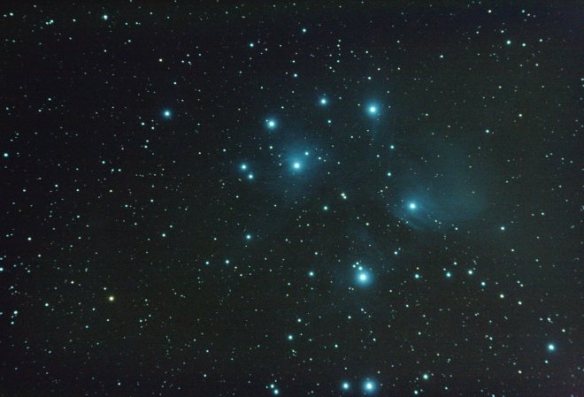
Lets try with my image of M45 – Pleiades taken with a Skywatcher 80ED.

M45 - Pleiades Benoit Guertin M45 – Pleiades
Benoit Guertin

The first step is to create a new “brush” in the shape of diffraction spikes.  To do this, start with new canvas with a transparent background.  In the screen shot below, a new 1000 x 1000 pixel image with Fill with: Transparency

View original post 624 more words

Jupiter’s Great Red Spot – Could it be gone in 20 years?

One of the great targets for backyard astronomers is Jupiter, and spotting its moons, the cloud bands and the Great Red Spot is always a treat. Observations over a few days provides a good view into the dynamic nature of the clouds and the orbits of the Moon.  I haven’t yet managed to capture the Great Red Spot on photo, but maybe this fall as Jupiter comes back into view in the evening sky, I should make the effort to spot the GRS.  This is because ever since it’s discovery in the 1800s, it has been shrinking in size.  And at the current rate, it could be gone all together in as little as 20 years!

Jupiter's Great Red Spot (1995 and 2014) - NASA

Jupiter’s Great Red Spot (1995 and 2014) – NASA

In the last 10 years it has shrunk by 3000km, taken a more circular form and increased its rotational speed.  Amateur observations since 2012 have revealed that this phenomenon is even accelerating, shrinking by as much as 930km per year.  Current measurements have the GSR now pegged at under 15,000km in diameter.

As we head into the fall, Jupiter will become easier to observe.  By December Jupiter will be high in the sky around midnight. On February 6th, Jupiter will be at Opposition, fully illuminated by the Sun and at its closest to the Earth.

The photo in the title bar was taken by me back in September 17th, 2010, only 4 days before its closest approach, which shows that even with a small 80mm scope, quite a bit of detail can be captured when the conditions are right.

Creating Diffraction Spikes with GIMP 2.8

Updated on November 3rd, 2014

Photos of open star clusters always appear to be more pleasant when stars have diffraction spikes.  But if your telescope does not have support vanes from a secondary mirror you are out of luck.  One solution is to simply tape in a cross pattern some string or fishing line over the dew shield.  Or you can turn to digital enhancement.  Below is a procedure to enhance your photos by digitally adding diffraction spikes using GIMP 2.8. in 8 easy steps!  No special plugin or filter required.

Lets try with my image of M45 – Pleiades taken with a Skywatcher 80ED.

M45 - Pleiades Benoit Guertin

M45 – Pleiades
Benoit Guertin

The first step is to create a new “brush” in the shape of diffraction spikes.  To do this, start with new canvas with a transparent background.  In the screen shot below, a new 1000 x 1000 pixel image with Fill with: Transparency

Create new image with transparent background

Create new image with transparent background

Then draw a grey straight horizontal line.  I’ve used the Pencil Tool to create a thin solid line, 4 pixel width end about 300 pixels length.  To ensure a straight line, click once to mark your starting point and holding the SHIFT+CTRL keys click again for the end point.  Note that my line isn’t centered, that is because the blur performed in the next step will shift the line to the left.

Draw a gray horizontal line

Draw a gray horizontal line

Next use Motion Blur to create the gradient (Filter > Blur > Motion Blur…) The blur angle must be 0 deg such that it’s in the same direction as the line.  In this example I’ve used a blur quantity of 150.

Add motion blur to create the gradient.

Add motion blur to create the gradient.

Duplicate the layer, rotate by 90deg and align both lines to form a cross.  A simple step by step is the following:

  1. Select > All
  2. Edit > Copy
  3. Edit > Paste as > New Layer
  4. Layer > Transform > Rotate 90deg clockwise
  5. Tools > Transform Tools > Move  (now align the vertical line to form a cross)
Duplicate, rotate and align both lines

Duplicate, rotate and align both lines

Once both layers align, you can merge them into a single layer.

Merge down to flatten into a single layer

Merge down to flatten into a single layer

Finally, using the Ellipse Selection Tool, select the cross and Copy to clipboard.  This will automatically assign it to the Clipboard Brush (red arrow and box below).  Note that I have kept the screenshot of my previous version with the black background in the snapshot below to make it easier to see.

GIMP - Diffraction Spike Creation - STEP 4

GIMP – Diffraction Spike Creation – STEP 4

We now have a new brush type that can be used to create diffraction spikes with nothing more than a single click. Yay!  The Paintbrush will show up as a cross but with dotted line (see red arrow in screenshot below).  Size and angle can be adjusted via the Tool Option Box; see below sections with red boxes.  I use the Paintbrush tool to create the spikes.

Now have a new brush to create the diffraction spikes

Now have a new brush to create the diffraction spikes

Now it’s time to get down to business and add those diffraction spikes to the stars.  Start by opening your astrophoto and duplicating into another layer.  This duplicate layer will be blurred and used to transfer the colour information on the spikes.

In the duplicated layer (with the original layer turned off), use a heavy Gaussian Blur (Filter > Blur > Gaussian Blur…) to blend out the colours.  In this example, I used a blur value of 60px.  As the blurring makes the image darker, use the Curves Tool to bring the brightness back up.

Increase brightness after burring

Increase brightness after burring

Result of the blurred layer

Result of the blurred layer

Now create a Layer Mask for this blurred layer.  Select to initialize the Layer Mask to Layer’s alpha channel.

GiMP - Diffraction Spike Creation - STEP 7

GiMP – Diffraction Spike Creation – STEP 7

With both the original and blurred layer visible.  The blurred layer is selected and the blend Mode is set to Screen.  Select to edit the mask of the blurred layer (right mouse-click on the blurred layer), and click on the stars to draw the cross pattern.  A diffraction spike should instantly appear!  As your Brush is the cross pattern, you will see in dotted lines the size and angle.  If you don’t see your cursor, simple adjust the size (ex: 500).

GIMP - Diffraction Spikes Creation - STEP 8

GIMP – Diffraction Spikes Creation – STEP 8

Resulting image after clicking on a few bright stars:

M45 with diffraction spikes added

M45 with diffraction spikes added

Try different settings (a larger pen width for the initial cross pattern) or playing with the quantity of blurring and curve adjustment of the blurred layer.

If you have other improvements or suggestions, please share using the comment field below.

Creating Fake Diffraction Spikes

Status

Benoit Guertin's avatar

Found a way to create fake diffraction spikes using GIMP.  Process comes down to defining a new brush in the shape of a cross, and then using that brush to create spikes in a new layer. Will post a procedure in the next few days.

Today at Sunset – Partial Solar Eclipse

Aside

Weather permitting, North America will have a partial solar eclipse today October 23rd.  The eclipse will take place at sunset

Information available at the NASA Eclipse web site.

People located west and north will be at a better location to see a greater portion of the eclipse.  In the east, the eclipse will start around 5:40pm EDT, but will end after sunset.

Various methods of viewing the eclipse safely is listed in a CBC News article