
Updated procedure to use a transparent background for the brush pattern. Also broke down certain steps into more details.

Updated on November 3rd, 2014
Photos of open star clusters always appear to be more pleasant when stars have diffraction spikes. But if your telescope does not have support vanes from a secondary mirror you are out of luck. One solution is to simply tape in a cross pattern some string or fishing line over the dew shield. Or you can turn to digital enhancement. Below is a procedure to enhance your photos by digitally adding diffraction spikes using GIMP 2.8. in 8 easy steps! No special plugin or filter required.
Lets try with my image of M45 – Pleiades taken with a Skywatcher 80ED.
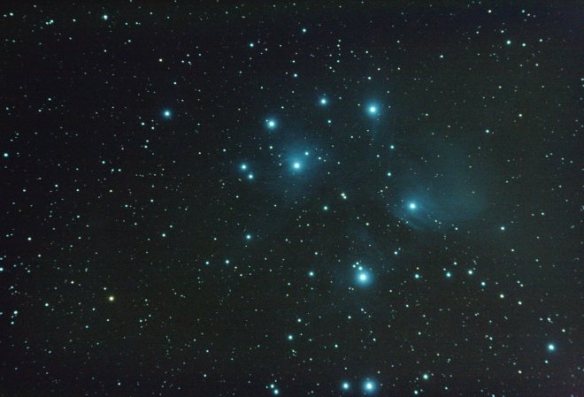 M45 – Pleiades
Benoit Guertin
The first step is to create a new “brush” in the shape of diffraction spikes. To do this, start with new canvas with a transparent background. In the screen shot below, a new 1000 x 1000 pixel image with Fill with: Transparency
View original post 624 more words
 Ben Backyard Astronomy
Pingback: M44 Beehive Cluster | Ben Backyard Astronomy
I love that you can add diffraction spikes to photos digitally.
LikeLiked by 1 person